
AI
CIO View: The Basics of AI Inference
This brief attempts to explain inference in simplified terms.
What is AI Inference
There are alot of articles out there which assume the reader is well versed in AI architecture and execution. In our conversations with technology leaders broadly this couldn't be further from the truth and the patterns are continuing to evolve at a phenomenal pace. This article is meant to simplify the concept of operating AI, explain what inference is and aspects that will be important to usage. Usage whether selecting open or proprietary models as well as ways to control outcomes including cost.
Every time someone in your organization asks an AI tool a question, you pay for it. That moment is called inference, and it is where most AI money is spent. Training a model happens once and although costly inference happens every day, for every user, for every answer. Deloitte figures reported by Computerworld put inference at half of all AI compute in 2025 and about two thirds in 2026. A recent Red Hat article by Cedric Clyburn shows how inference works under the hood. Its most striking point is valuable in that the same GPU can serve about 3 users or about 50 users. The only difference is how its memory is managed. That gap is a both a business and leadership decision, not just an engineering detail to which it is often delegated. This brief attempts to retell the article in simple terms and uses a restaurant kitchen as a guide. We end with practical steps for building AI capability in house that you can hopefully apply to your practice.
A Simple Comparison
Think of an AI service as a busy restaurant. This section walks through the kitchen one station at a time.
1. Inference is a stack, not a file
A model (LLM) on its own serves nobody. It is like a recipe book sitting on a shelf. To serve real users, three parts must work together.
- Model weights. The recipe book. These files hold the billions of numbers the model learned in training. Examples include Claude, Astra, Kimi, GLM and Qwen.
- Inference server. The kitchen manager. Software such as vLLM loads the model, takes incoming orders, and runs the tricks that save money.
- Hardware accelerator. The stove which is iusually a GPU that does the heavy math.
You can skip the manager and run a model straight on a GPU. That works for one person testing, which can be a useful option. It falls apart when many people order at once. It's like opening a web page file on your laptop versus serving it to the world with a real web server. Context is very important though to determining how you might want to consider using.
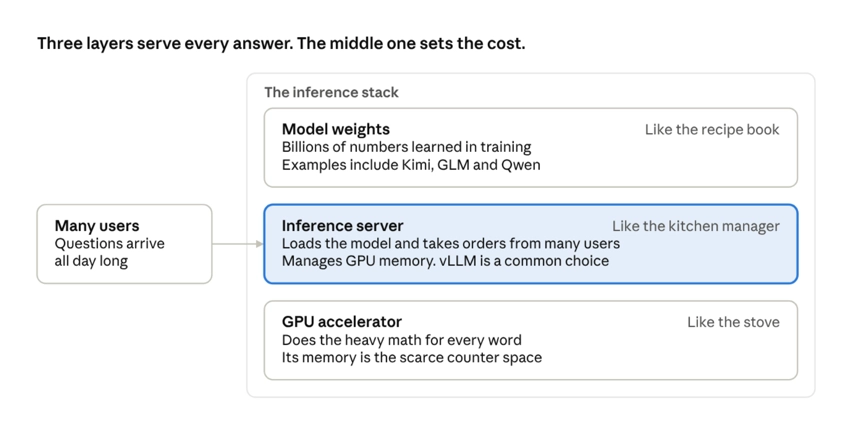
Most teams focus on the model. The middle layer decides how many users each GPU can serve.
2. The model writes one word at a time
Models do not write a whole answer at once. They write one small piece, called a token, at a time. A token is roughly a word or part of a word. Each new token depends on every token before it.
Start with the prompt "The quick brown". The model predicts "fox" and adds it. Now it reads "The quick brown fox" and predicts "jumps". It repeats until it decides the answer is done.
Here is the part most non technical leaders miss. Every token requires a full trip through the entire model. A 500 token answer means the model runs 500 times. Picture a storyteller who must think through the whole story again before saying each new word.
This also explains a pattern you have seen in chat tools. The Hugging Face\ team explains that there is a short wait before the first word, then words stream out one by one. The wait is the model reading your prompt. The stream is the model writing.
3. The KV cache is the model's notepad
As the model reads each token, it creates notes about it. The model must look back at these notes for every new word it writes.
The key insight is that old notes never change. Once the model writes a note about word, that note stays the same for the rest of the answer. So instead of rewriting old notes every time, the server saves them in memory. It only writes new notes for the newest word.
Think of a waiter with an order pad. Without the pad, the waiter would ask the whole table to repeat their order before each dish comes out. With the pad, the waiter just adds new items. The pad saves a huge amount of work, but it takes up space.
4. How big the notepad gets
The notepad grows with every token and every user. An article works through an efficient 120 billion parameter open model from OpenAI. It needs about 36 KB of memory per token.
| Conversation size | Tokens | Notepad memory per user |
|---|---|---|
| A typical chat turn | 2,000 | about 75 MB |
| A standard production request | 8,000 | about 300 MB |
| A long document or codebase | 32,000 | about 1.2 GB |
| The model's maximum | 128,000 | about 4.8 GB |
And that is a model built to be cheap to serve. A dense 70 billion parameter model such as Llama 3.3 70B needs about 9 times more notepad memory for the same conversation.
Model design choices drive your cost more than most people expect.
5. Where your GPU budget goes
GPU memory is like counter space in a kitchen. The recipe book takes up most of it. The notepads for each customer must fit in what is left.
The 120 billion parameter model fits on one NVIDIA H100 GPU with 80 GB of memory. After loading the model, only about 15 to 20 GB remains for notepads. Now compare two ways to use that space.
- The old way. Reserve the maximum space for every request, just in case. Each user costs 4.8 GB whether they need it or not. The card serves about 3 users at once.
- The better way. Give each request only what it actually uses. A typical request costs about 300 MB. The same card serves 50 to 60 users.
Same GPU. Same model. The only change is how memory is managed. It is like a restaurant that seats every party at a banquet table for twelve, even couples. The room looks full while most chairs sit empty.
The original vLLM research paper from UC Berkeley found that older serving systems used only 20 to 38 percent of their reserved memory for real work. The rest was wasted.
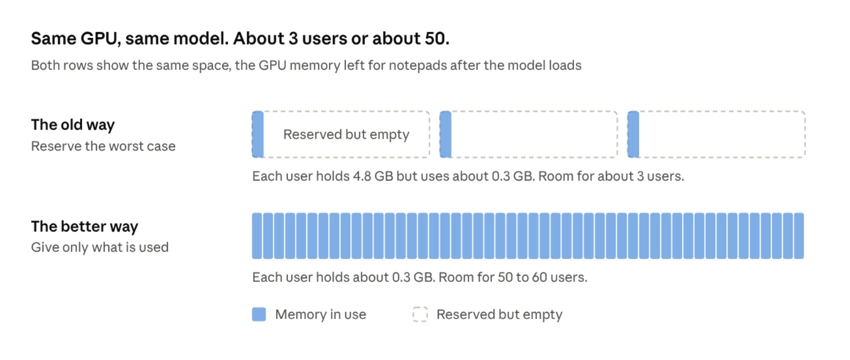
The model and the hardware are identical in both rows. Only the memory rules change, and capacity grows roughly 17 times.
6. Three tricks inside a good inference server
A production server such as vLLM uses three main tricks. None of them change the model, they just change how well you run it.
PagedAttention. Small tables you push together. Blocks are handed out only as a conversation grows, and they can sit anywhere in memory. A lookup table tracks which blocks belong to whom, like a host with a seating chart. The idea comes from how computer operating systems have managed memory for decades. Abhijit Roy at Red Hat walks through it simply. In the vLLM paper, this approach cut memory waste to near zero and handled 2 to 4 times more work than earlier systems at the same response times.
Continuous batching. Seat the next party the moment a table opens. Older servers grouped requests into a batch and waited for the slowest one to finish before starting new ones. Continuous batching lets finished requests leave and new ones join right away. The GPU never sits idle waiting on one long answer. Hugging Face credits this approach with letting chat services handle thousands of people at once.
Prefix caching. Make the house sauce once. Many requests start the same way. They share a system prompt, the same policy document, or the same chat history. Prefix caching reuses the notes already made for that shared opening instead of making them again. The vLLM documentation notes one limit. It speeds up reading the prompt but not necessarily writing long answers.
7. Shrinking the model itself
The last lever is quantization. It stores the model's numbers with less detail, so they take less space and run faster.
Think of a photo. A raw photo stores millions of colors. A well compressed photo stores far fewer, yet looks the same to your eye. Red Hat's quantization guide uses this same picture. Most models ship with 16 bits per number. Dropping to 8 bits cuts memory in half. Dropping to 4 bits cuts it to a quarter.
The savings are real. The guide shows Llama 4 Scout, a 109 billion parameter model, needing three 80 GB GPUs at 16 bits. At 8 bits it needs two. At 4 bits it fits on one.
It also runs faster, for two reasons. Smaller numbers move through the GPU faster, so each word appears sooner. Lower precision math also lets the chip do more work per second. In a Red Hat test of Llama 3 70B on two H100 GPUs, 8 bit numbers delivered about 3 times the throughput. The wait for the first word under heavy load fell from over 30 seconds to about 5 seconds.
Does it make the model dumber? Done well, barely. Red Hat's team ran over half a million evaluations and found carefully quantized 8 bit models kept about 99 percent of full accuracy. Even at 4 bits, large models of 70 to 235 billion parameters keep about 99 percent, while small models of 7 to 14 billion keep about 95 to 98 percent. The key words are done well. Good methods first test the model on sample data to learn which numbers matter most, then protect them. Simply rounding every number is what hurts quality.
8. The one page cheat sheet
| Technique | Kitchen version | When it applies | What you get |
|---|---|---|---|
| PagedAttention | Small tables pushed together as a party grows | While running | Many more users in the same memory |
| Continuous batching | Seat the next party the moment a table opens | While running | The GPU stays busy |
| Prefix caching | Make the house sauce once | While running | No repeat work on shared openings |
| Quantization | A compressed photo that looks the same | Before you deploy | Fewer GPUs and faster answers |
| Sparsification | Skip recipe steps that do not change the taste | Before you deploy | The model skips the parts that matter least |
Recap and Guidance
Recap
Training is a one time cost. Inference is the bill that arrives every month, and it is most of the bill. Every word an AI writes is a full trip through the model. The notepad of saved notes grows with longer conversations and more users. Managing that notepad is the main job of your inference server. Get it wrong and one GPU serves about 3 people. Get it right and the same GPU serves about 50. Shrink the model or adjust your operational model and you need fewer GPUs to begin with.
Guidance for leaders building AI capability in house
- Budget for serving, not just building. Treat inference like electricity, a running cost that grows with use. Track cost per answer and users per GPU from day one.
- Never serve models raw. Put a production inference server such as vLLM between your models and your GPUs. Ask every vendor and team which server they use and whether PagedAttention, continuous batching and prefix caching are turned on.
- Pick models for serving cost, not just test scores. Two models of similar quality can differ by 9 times in memory per conversation. Ask your team for the KV cache cost per user before you approve a model.
- Make quantized models the default, then prove them on your data. Start with 8 bit versions of proven open models. Set a quality bar and a test set drawn from your own work before anything goes live.
- Design your apps to share. Use standard system prompts and reuse shared documents so prefix caching can do its job. Set sensible limits on conversation length for each use case, since long context eats memory.
- Measure what users feel and what finance sees. Track time to first word, words per second, users per GPU and cost per thousand answers. Test under realistic load, not with one user at a time.
- Run AI as a shared platform, close to your data. Offer approved models to teams as one internal service, much like a private API. Public cloud suits early tests. When workloads are steady and predictable, running your own can avoid paying a premium, as Lenovo's global CIO Arthur Hu told Computerworld. It also keeps sensitive data in your hands, which matters for privacy and sovereignty.
The bottom line is simple. Inference efficiency is a lever you control. The same hardware can do many times more work when the stack is tuned, so start with one high value use case, measure it, and scale what works.
References
| Title | Author | Publisher and date |
|---|---|---|
| How AI inference works, clearly explained | Cedric Clyburn | Red Hat Blog, August 26, 2026 |
| LLM quantization guide: How to do it, and how it helps | Cedric Clyburn | Red Hat Developer, September 2, 2026 |
| Efficient Memory Management for Large Language Model Serving with PagedAttention | Woosuk Kwon, Zhuohan Li, Siyuan Zhuang, Ying Sheng, Lianmin Zheng, Cody Hao Yu, Joseph E. Gonzalez, Hao Zhang, Ion Stoica | ACM SOSP, 2023 |
| How PagedAttention resolves memory waste of LLM systems | Abhijit Roy | Red Hat Developer, July 24, 2025 |
| Continuous batching from first principles | Rémi Ouazan Reboul, Arthur Zucker, Luc Georges | Hugging Face Blog, November 25, 2025 |
| Automatic Prefix Caching | vLLM project contributors | vLLM documentation |
| We ran over half a million evaluations on quantized LLMs, here's what we found | Eldar Kurtić, Alexandre Marques, Mark Kurtz, Dan Alistarh | Red Hat Developer, October 17, 2024 |
| CES 2026: AI compute sees a shift from training to inference | Maria Korolov | Computerworld, January 8, 2026 |
© 2026 Symvoulos LLP. You may quote or excerpt this article with attribution and link to the original URL - \<> as well as referenced material. Republication in full, adaptation, translation, or use as the basis of derivative or secondary works requires attribution. Removal or alteration of attribution is prohibited.
Stathy Touloumis is President and Owner of Symvoulos (symv.ai), a boutique technology consultancy serving all sectors of business and government entities including regulated enterprises. His experience spans over 30 years with most recent to state, local, and public entities across infrastructure modernization, security, service delivery strategy, and the governance questions raised by AI adoption. Symvoulos’ expertise starts where most stall: multi-year cost models, risk vectors and staffing plans an agency can defend in a budget hearing. Follow us at symv.ai or reach out to us to collaborate.
Want to talk about your own case?
Share a few details. A person on our team will reply.
Start a conversation